
Skip to content

Managed Services

Request a Quote
Request a Quote

Disable Hello

  1.   »  
  2. Disable Hello

Disable Hello

June 20, 2022May 21, 2023 [email protected]tech stuff

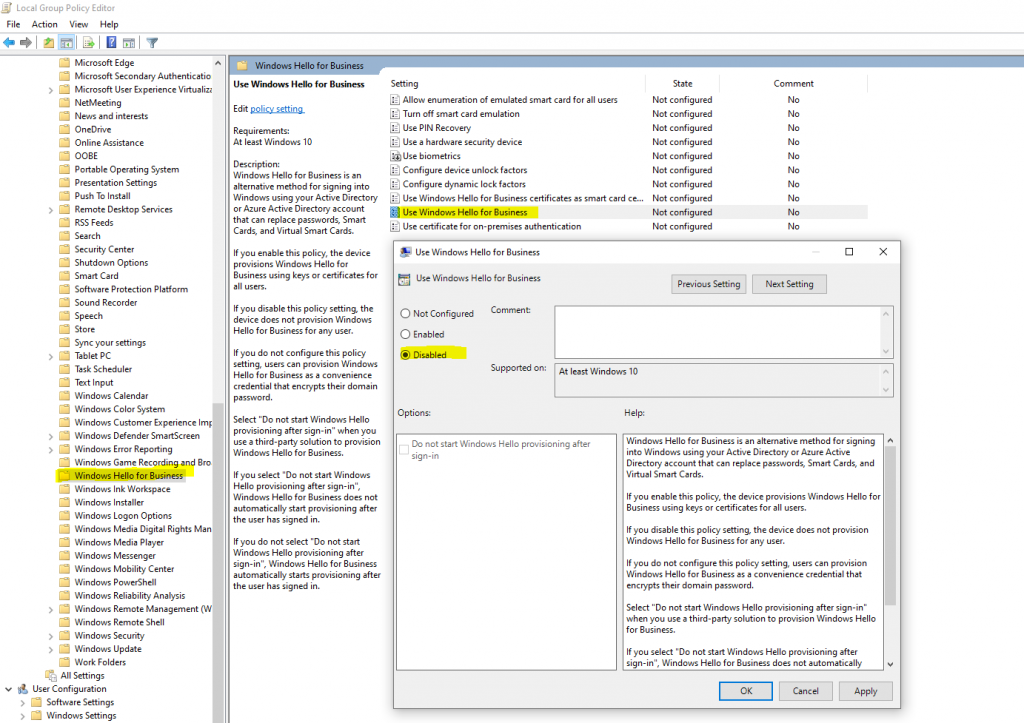
Disable Windows Hello for Business by using a Group Policy

One way to disable Windows Hello for Business is by using a group policy.

Computer Configuration or User Configuration -> Administrative Templates -> Windows Components -> Windows Hello for Business

Here for Use Windows Hello for Business select Disabled.
Post navigation

Next: Back up your Documents, Pictures, and Desktop folders with OneDrive

[stm-calc id="412"]

Proudly powered by WordPress | Theme: microt-ecommerce by reviewexchanger.